
Handling Unsubscribe and Right to Be Forgotten Requests Under POPIA
When a subscriber claims that their unsubscribe request was not honoured — and further invokes their rights under the Protection of Personal Information Act (POPIA) — this becomes a formal compliance matter.
It is critical that this is handled:
- Promptly
- Methodically
- With documented evidence
- In alignment with POPIA
Under POPIA, once consent is withdrawn, marketing communication must stop immediately. A data subject may also request access to their data, correction, or full de-identification.
This guide explains both:
- How to verify and correct an unsubscribe issue
- How to fulfil a Right to Be Forgotten (de-identification) request within BulkMail
Understanding the Legal Position Under POPIA
Under POPIA, the following sections apply:
- Section 9 – Processing must stop when consent is withdrawn
- Section 23 – A data subject may request access to all personal information held
- Section 24 – A data subject may request correction, deletion, or destruction
- Section 69 – Direct marketing requires consent and must include an opt-out
There is a legal difference between:
- Unsubscribe (opt-out from marketing)
- Right to Object to Processing
- Right to Erasure / De-identification (Right to Be Forgotten)
An unsubscribe stops marketing communication.
A Right to Be Forgotten requires removal or irreversible de-identification of personal information.
Step 1: Verify the Unsubscribe Status
Before taking further action:
1. Locate the User Record
- Go to Lists & Users
- Search for the email address
- Open the User record
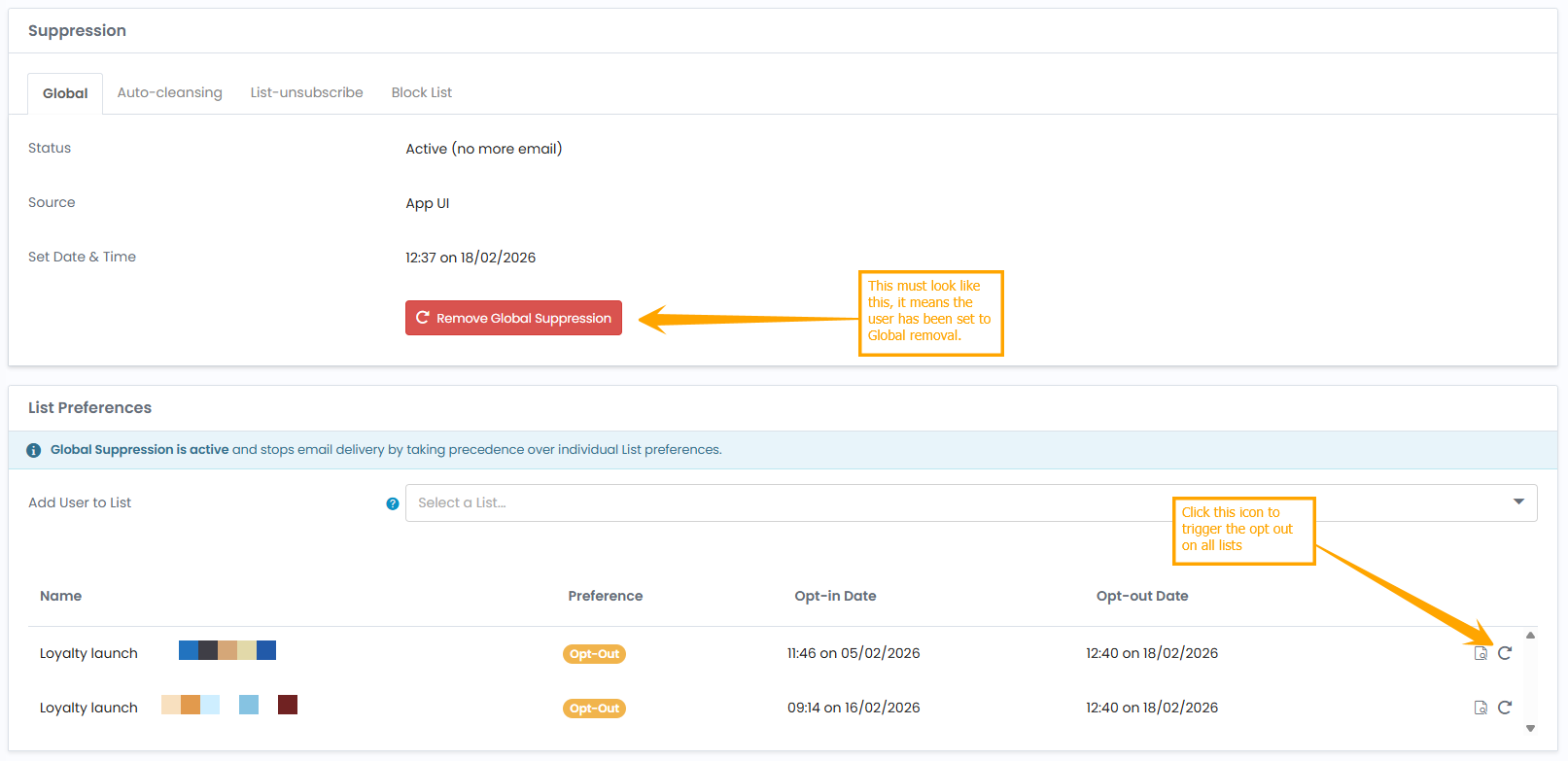
2. Check Email Preferences
Confirm whether the User is:
- Active on any Lists
- Suppressed
- Opted out at Email Profile level
3. Check Email Profile Configuration
If multiple Email Profiles are used:
- Confirm the unsubscribe link was tied to the correct Email Profile
- Confirm the Opt-out Page was properly assigned
4. Review Campaign & Workflow Activity (Automation & Forms)
Under the User’s activity history:
- Identify which email was received after unsubscribe
Determine whether it was:
- A Campaign
- A Workflow email
- A transactional message
Workflows can trigger via multiple mechanisms including link clicks, API calls, or list growth. These triggers must be reviewed carefully.
Step 2: Identify How Further Communication Occurred
If the User received email after unsubscribing, investigate whether:
- They were re-imported via CSV
- They were re-added via API integration
- They exist on multiple Lists
- They were added through an external Form
- An automation retriggered
- The email was transactional rather than marketing
Most unsubscribe complaints are caused by re-importing data or multiple List structures rather than a failure of the unsubscribe mechanism itself.
Document your findings.
Step 3: Fulfil the Subject Access Request (If Requested)
If the User has requested:
- A breakdown of all personal information held
- Proof of consent
- Processing history
You must provide:
- All stored profile fields
- Custom fields
- List memberships
- Tags
- Consent records (where captured via Forms)
- Engagement history
Export and retain a copy for your records.
Response should be provided within a reasonable period. As best practice, respond within 10 working days.
Step 4: Execute Right to Be Forgotten (De-identification)
If the User requests deletion or destruction of personal data, you must:
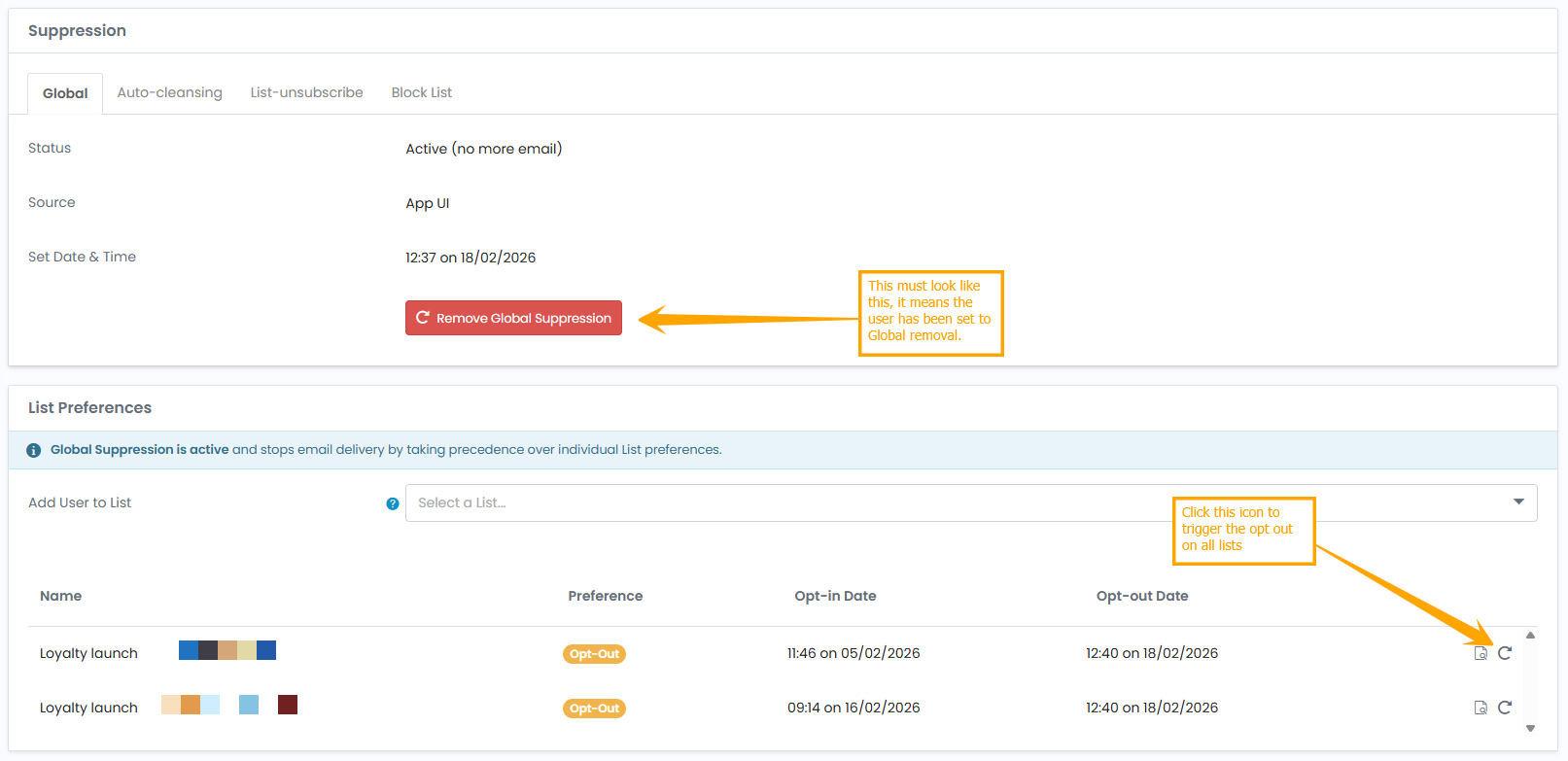
1. Remove from All Lists
Ensure the User is not actively subscribed anywhere. This should be done under Email Preferences. Here you can update the user to Set Global Suppression and Opt-out from All Lists.
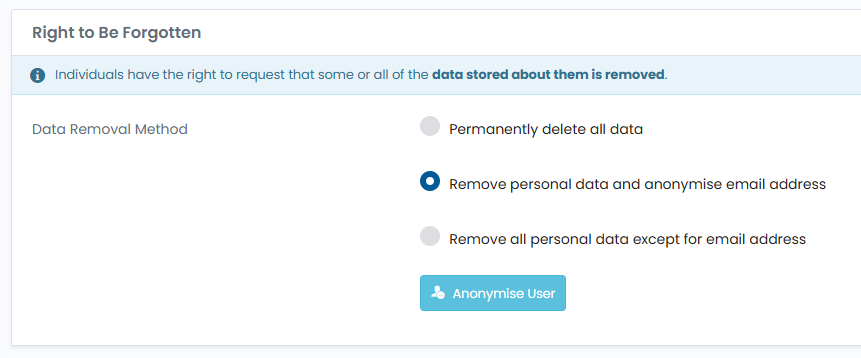
2. Anonymise the User Record (Tab: Data Privacy)
Anonymisation is strongly recommended over deletion. Use this option: Remove personal data and anonymise email address.
Why?
- It prevents the same email address being re-added through future imports.
- It preserves suppression control.
- It protects against reprocessing errors.
Anonymisation should:
- Remove personally identifiable information
- Replace identifiable fields with irreversible values
- Retain system-level suppression status
You may add screenshots here showing:
- Editing the User record
- Clearing profile data
- Updating to anonymised placeholder values
3. Add to Global Suppression (If Appropriate)
Adding the email address to Global Suppression ensures:
- It cannot receive future campaigns
- It cannot be accidentally reactivated
Step 5: Remove from External Systems
If you use:
- API integrations
- E-commerce platforms
- CRM systems
- Zapier
- Custom automation
You must also:
- Delete or anonymise the User in those systems
- Prevent automatic re-synchronisation
Failure to do so may result in the User being recreated inside BulkMail.
Under POPIA, you are responsible for ensuring deletion extends to all processors and connected systems.
Step 6: Provide Formal Confirmation to the Data Subject
Your response should include:
- Confirmation that marketing communication has ceased
- Explanation of how the unsubscribe issue occurred (if applicable)
- Confirmation of de-identification or deletion
- Confirmation that connected systems were addressed
- Contact details for further queries
Keep tone professional and factual. Avoid admission of negligence before internal investigation is complete.
Preventing Future Unsubscribe Complaints
To reduce risk:
- Use only BulkMail native unsubscribe links
- Avoid manual re-importing of historical CSV files
- Implement double opt-in for new subscribers
- Regularly audit Workflow triggers
- Use Global Suppression strategically
- Train staff on List segmentation logic
Maintaining List hygiene and permission integrity is not only a compliance requirement — it protects deliverability and sender reputation.
Internal Documentation Checklist
For compliance protection, retain:
- Screenshot of unsubscribe status
- Screenshot of anonymised record
- Export of stored data
- Notes explaining root cause
- Date and time actions were completed
This documentation may be required if the matter is escalated to the Information Regulator.
Below are the official South African government links to the relevant sections of the Protection of Personal Information Act, 4 of 2013 (POPIA). These are hosted on the Department of Justice / Information Regulator legislative portal.
Official POPIA Legislative Source
Full Act (Protection of Personal Information Act, 4 of 2013):
- The Protection of Personal Information Act, 2013 (Act 4 of 2013)
- https://inforegulator.org.za/popia/
Section 9 – Lawfulness of Processing
Processing must stop when consent is withdrawn.
Section 23 – Access to Personal Information
A data subject may request access to personal information held by a responsible party.
Section 24 – Correction or of Personal Information
A data subject may request correction, deletion or destruction.
Section 69 – Direct Marketing by Means of Unsolicited Electronic Communications
Direct marketing requires consent and must provide an opt-out mechanism.