
Testing Your Newsletter - Campaign Send vs Inbox Test
Before sending a live email campaign, it’s vital to test your newsletter properly. Testing ensures that all links, images, personalisation tags, and formatting display correctly across inboxes and devices.
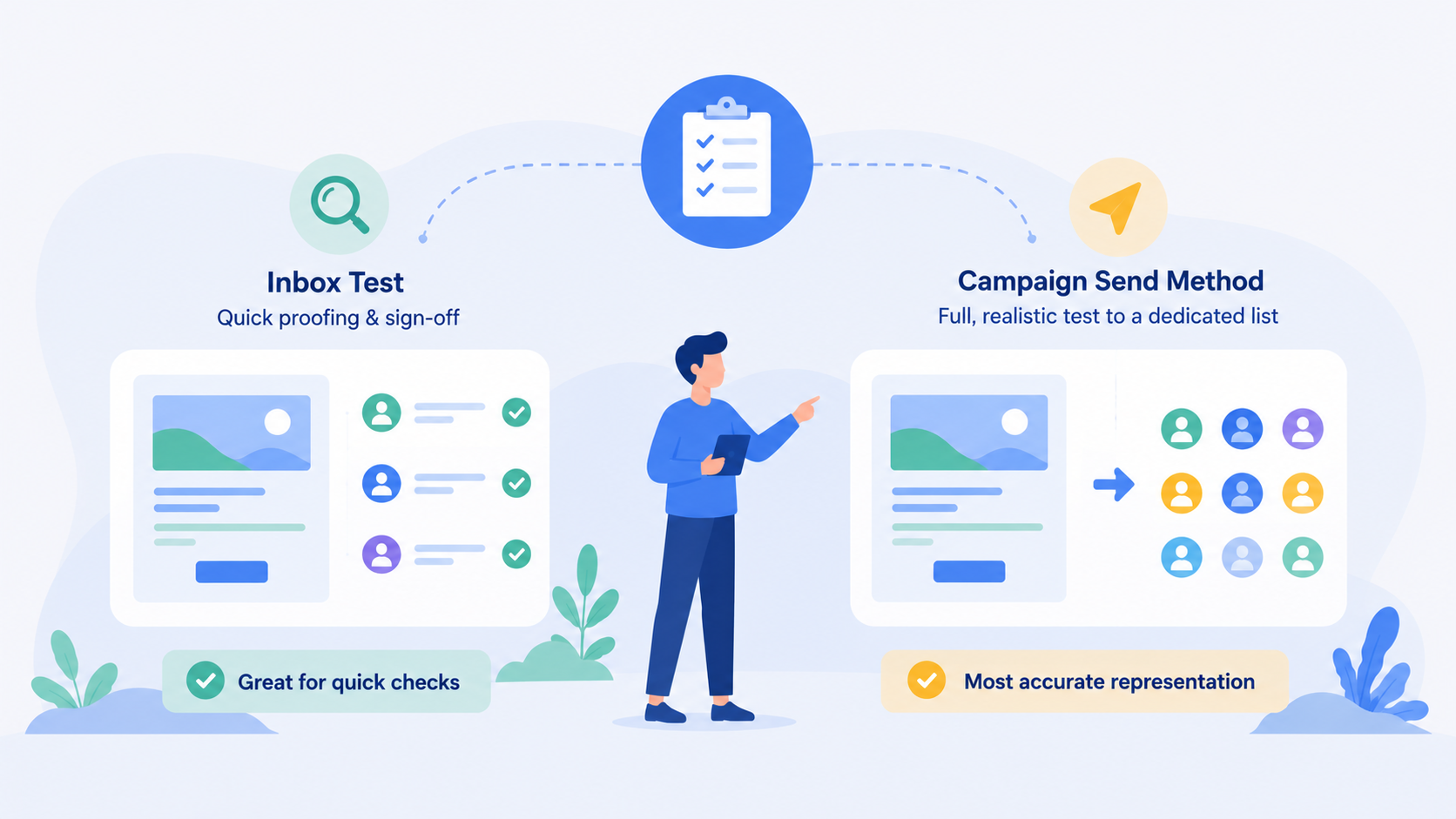
BulkMail offers two ways to test your emails
- Inbox Tests – a quick option designed for proofing and sign-off.
- Campaign Send Method – a full, realistic send to a dedicated test list.
While both serve a purpose, the Campaign Send Method provides the most accurate representation of how a real campaign will behave in the inbox. This article explains how each method works, their key differences, and why using a dedicated test list for campaign-based testing delivers more reliable results.
Why Testing Matters
Testing is not just about spotting spelling mistakes or broken links. It helps you:
- Confirm that personalisation and dynamic content render correctly.
- Verify that tracking, segmentation, and automations behave as expected.
- Check how the message appears in actual inboxes and on mobile devices.
- Reduce the risk of deliverability issues when sending to your full audience.
Running tests also gives teams the opportunity to collaborate on approvals, allowing designers, copywriters, and managers to review the final version before scheduling the live campaign.
Option 1: Inbox Tests
Purpose and Use Case
Inbox Tests are designed for proofing email templates before they are scheduled as a campaign. They are ideal when you want to quickly send a preview to yourself or colleagues for review and approval.
Inbox Tests allow you to:
- Check visual layout, links, and text accuracy.
- Gather feedback or approvals from others.
- Review both the HTML and plain text versions of your message.
These tests are sent only to Test Users that you create in the Inbox Test panel.
How to Send an Inbox Test
- Click Templates in the sidebar.
- Open the Email Template you want to test.
- Choose the Testing Tab at the top of the tabs menus.
- Select the Test Users (or add new ones).
- Click Send Emails.
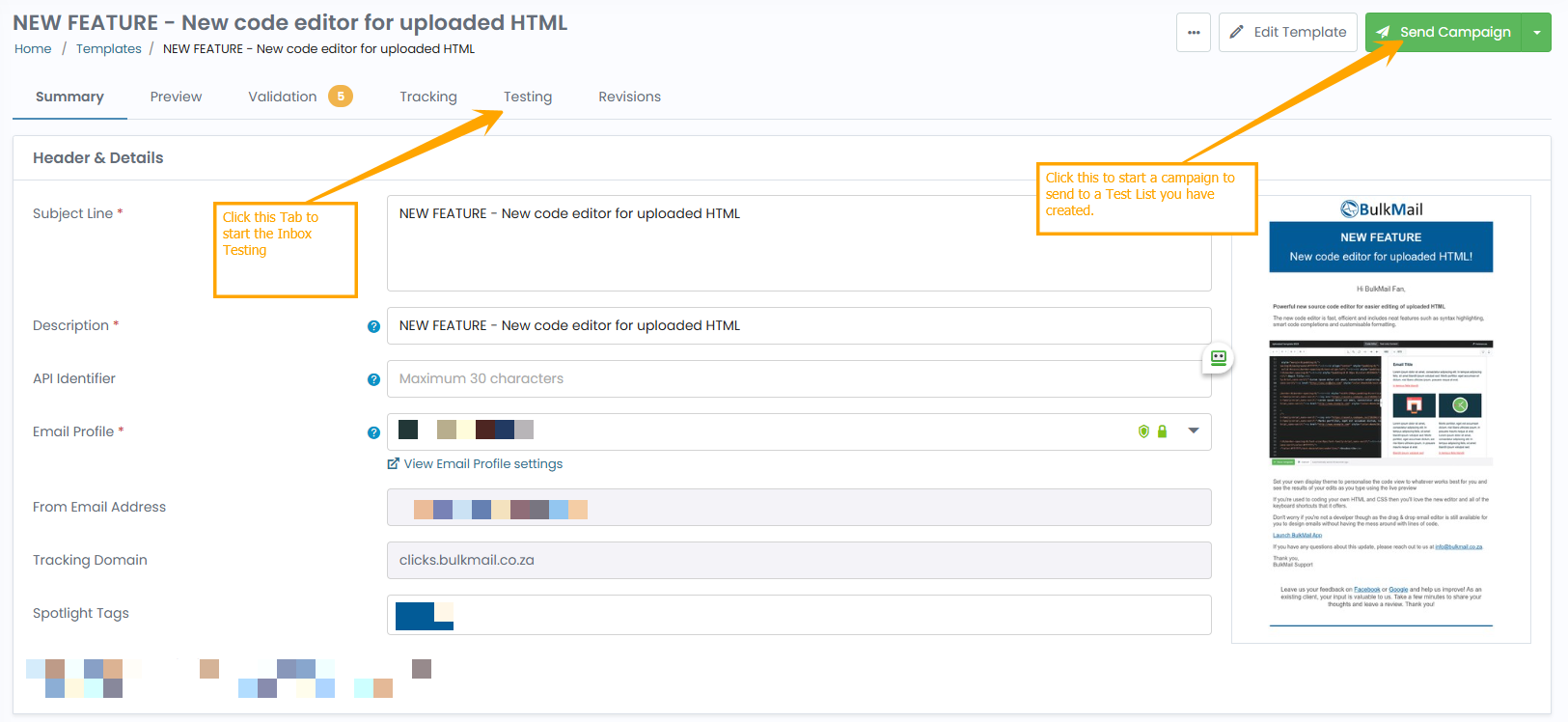
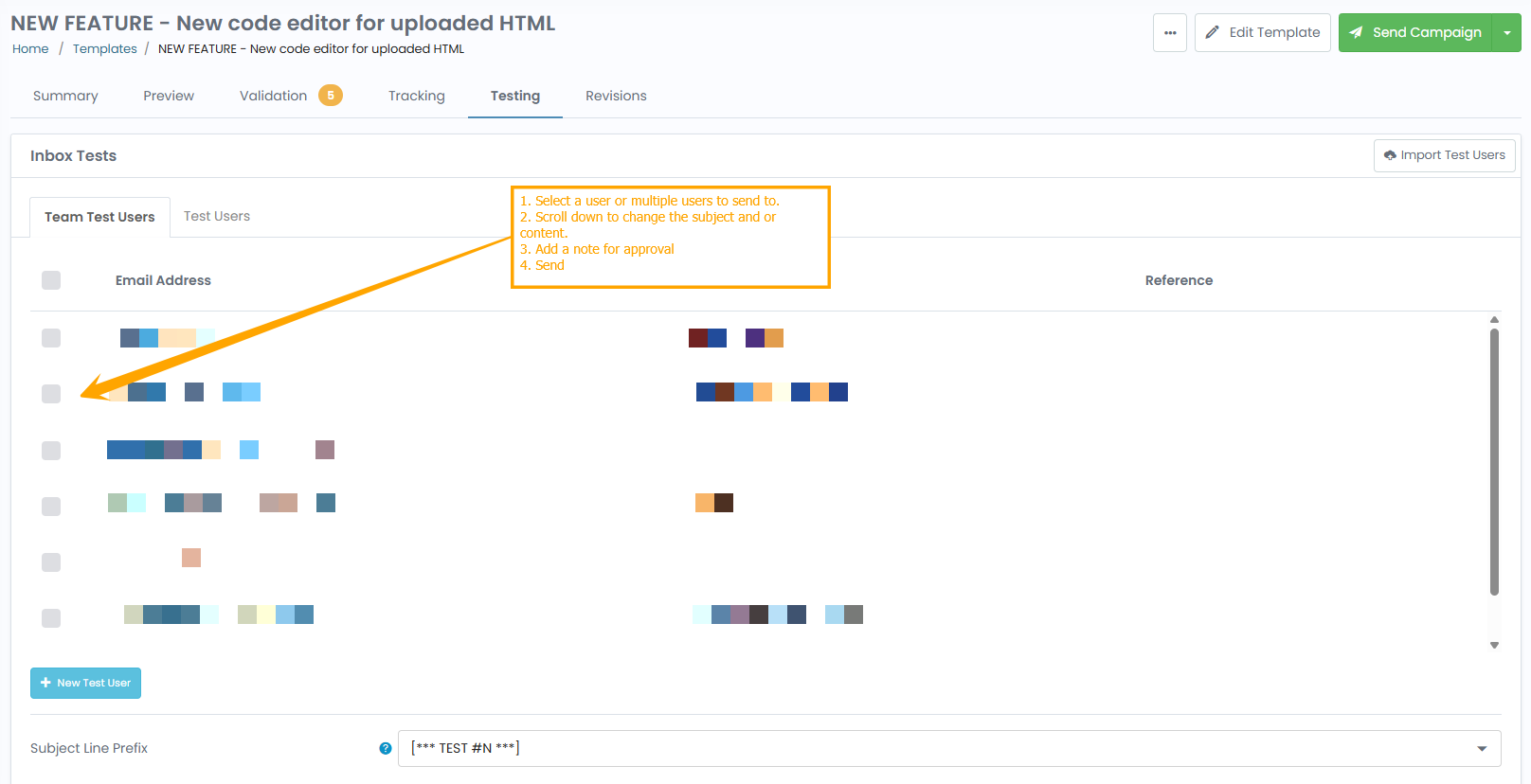
Inbox Tests include a subject-line prefix (for example, [Test]), so you can easily identify test versions in your inbox. This prefix can be disabled if required, and you can insert a short approval message or request feedback directly through the test email interface.
Benefits of Inbox Tests
- Quick and easy to set up.
- Perfect for proofing design and layout.
- Supports team feedback and approval workflows.
- Useful when testing both HTML and text-only versions.
Limitations of Inbox Tests
Although convenient, Inbox Tests do not replicate the conditions of a real campaign send. Delivery may not always occur through the same sending process used for live campaigns, meaning:
- Results such as opens, clicks, or tracking data are not representative.
- Some tests may be delayed or fail to deliver due to inbox filters.
- Automation, throttling, or intelligent sending rules are not applied.
- Merge tags and personalisation may display only for Test User data.
For these reasons, Inbox Tests are best used for visual and approval checks, not for measuring performance or deliverability.
Option 2: Campaign Send Method (Recommended)
Purpose and Use Case
The Campaign Send Method involves sending your test newsletter as a real campaign to a dedicated test list. This approach mirrors the entire delivery process exactly as it would occur for your live recipients.
Using a campaign send ensures that:
- The same sending servers, tracking domains, and authentication methods (SPF, DKIM, DMARC) are used.
- All personalisation, segments, and dynamic content are processed normally.
- Deliverability and inbox placement reflect true performance.
This makes it the most reliable way to test how your email will perform once sent to your subscribers.
How to Send a Campaign Test
- Create a dedicated test list that includes your internal team or approved test addresses.
- Click Campaigns in the sidebar and open the email you want to test.
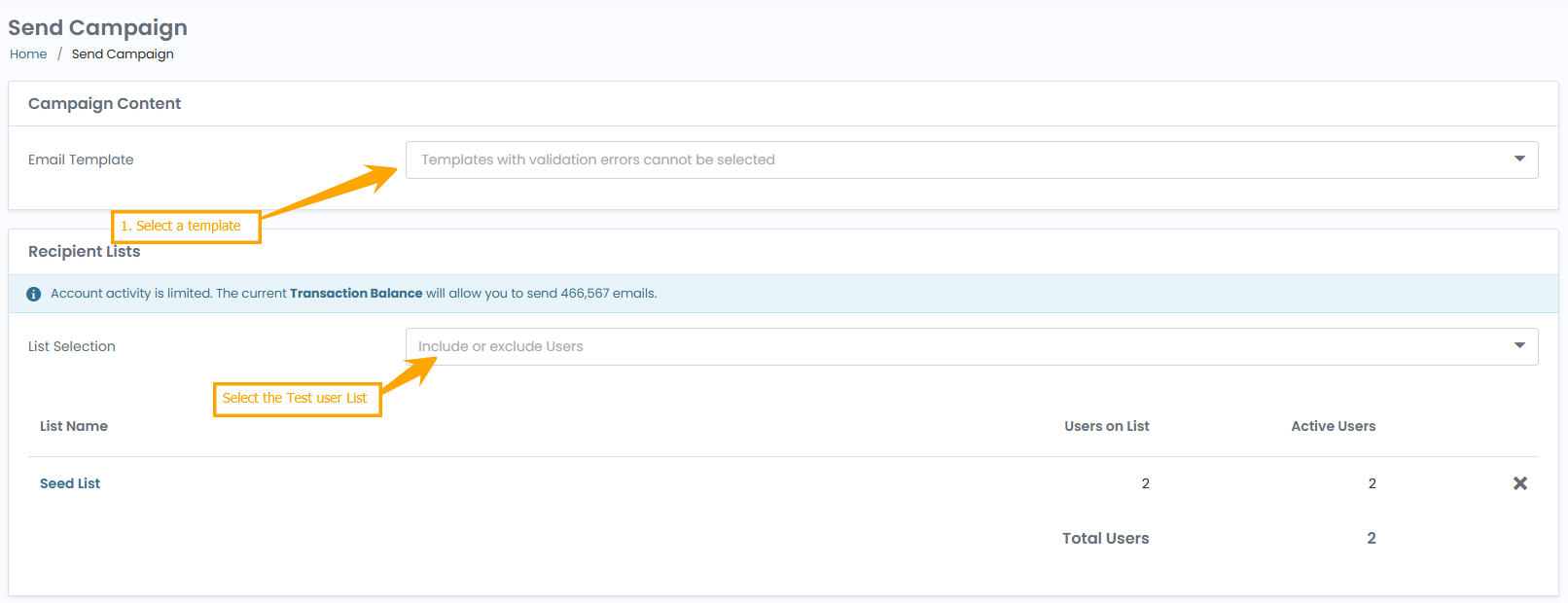
- Click New Campaign at the top right of the Campaign screen.
- Select a template from the list.
- Select your Test List from the Lists panel.
- Complete your Delivery Settings and confirm the send.
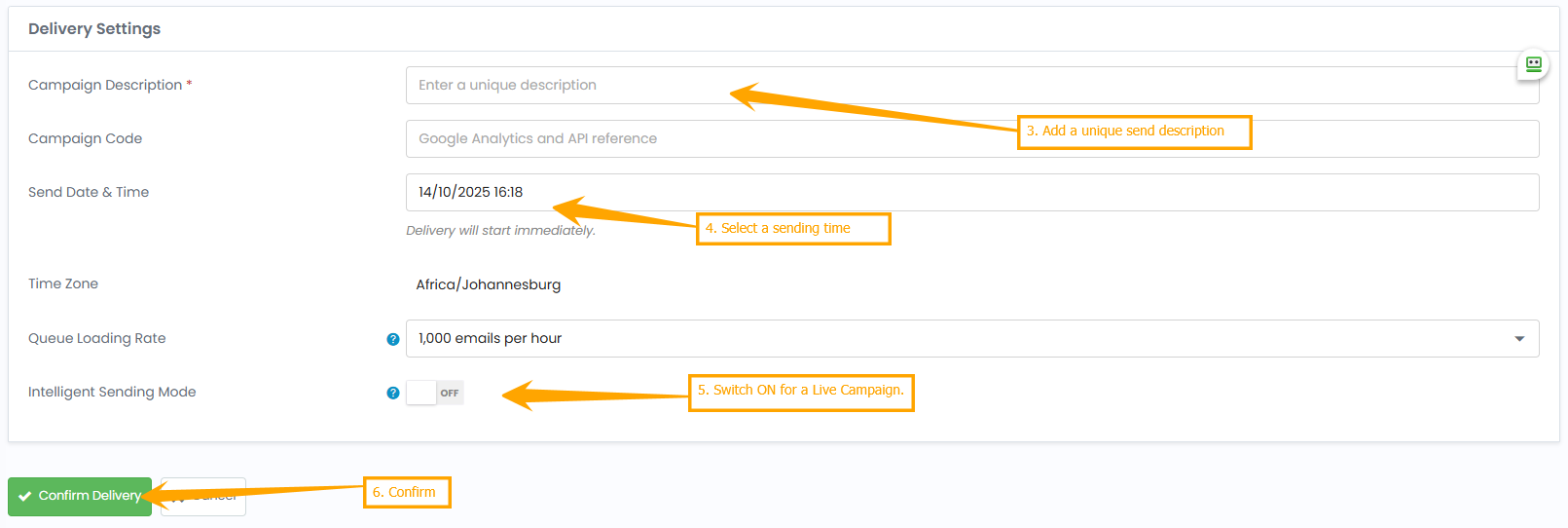
Why a Dedicated Test List Works Best
A separate test list allows you to:
- Keep testing activity independent from your main subscriber data.
- Track and review real metrics (opens, clicks, bounces) without affecting campaign history.
- Maintain consistency in how emails are processed by filters and servers.
- Simulate real sending conditions — including throttling, delivery windows, and suppression rules.
Using this method, you can safely test even complex campaigns with multiple segments or automation triggers.
Comparing the Two Methods
| Feature | Inbox Test | Campaign Send (Recommended) |
|---|---|---|
| Purpose | Proofing and approval | Full end-to-end testing |
| Recipients | Test Users only | Dedicated internal test list |
| Delivery path | Simplified route | Full live sending process |
| Accuracy of metrics | Not representative | Real open and click data |
| Personalisation | Limited to test data | Fully rendered per user |
| Use for approvals | Yes | Yes, via real inbox preview |
| Automation and triggers | Not supported | Fully supported |
| Performance testing | Not reliable | Accurate and realistic |
| Best for | Design checks and team sign-off | Deliverability, tracking, and pre-launch validation |
This comparison highlights that while Inbox Tests are convenient for quick reviews, campaign testing provides the only true reflection of how your message will perform once live.
When to Use Each Method
Use Inbox Tests When
- You’re sharing the template with team members for review.
- You need to check basic formatting, links, and spelling.
- You want quick proofing before final approval.
Use the Campaign Send Method When
- You’re validating deliverability or inbox placement.
- You’re testing dynamic content, segments, or merge tags.
- You want to confirm accurate tracking and metrics.
- You need to simulate real campaign conditions before sending to your full list.
Practical Testing Workflow
For the best results, BulkMail recommends the following workflow for campaign managers:
- Start with an Inbox Test Use this step for initial proofing — check visuals, links, and spelling. Collect internal feedback or approval from colleagues.
- Then Send a Campaign Test Once approved, send the newsletter to your dedicated test list using the Campaign Send method. This ensures deliverability, analytics, and automation behave exactly as they will during the real send.
- Review Metrics and Inbox Placement After sending, review the campaign report to check opens, clicks, and delivery performance. Note that Inbox Tests do not provide this level of insight.
- Make Adjustments and Re-Test if Needed If you identify any issues (e.g., images not displaying, incorrect links, or formatting differences), make corrections and repeat a quick campaign test.
By separating proofing (Inbox Tests) from performance validation (Campaign Send), you’ll gain both speed and accuracy in your testing process — without risking errors in your live campaigns.
Common Questions
Why does my Inbox Test sometimes fail to deliver? Inbox Tests use a simplified sending path and depend on test-user configuration. Occasionally, filters or validation steps can delay or block these tests. A campaign send uses the full delivery system and is therefore more consistent.
Do campaign tests count towards my email credit usage? Yes, since they are real sends. However, the benefits of seeing genuine deliverability and performance usually outweigh the small credit cost.
Can I use both methods together? Absolutely. Many teams use Inbox Tests first for sign-off, followed by a campaign send to confirm deliverability before launching the main campaign.
Should I delete my test list after use? No — maintain your test list permanently. This ensures you can reuse it for future campaigns, saving time and providing consistent results.
Further notes...
Testing your newsletter thoroughly is essential to ensuring professional, compliant, and high-performing email campaigns.
- Inbox Tests are quick and convenient for internal proofing and feedback.
- Campaign Send Tests deliver the most accurate and reliable results, showing exactly how your email will behave once live.
BulkMail strongly recommends maintaining a dedicated test list and using the Campaign Send Method as your final verification step before launching any campaign.
This approach allows you to send with confidence, knowing that your content, personalisation, and tracking all perform exactly as expected in real inbox conditions.