
How to Hide an Unused Newsletter Template
2 min read
If your templates list is becoming cluttered with designs you no longer use, you can hide them instead of deleting. This keeps your workspace clean while allowing you to retrieve the template later if needed.
How to Hide an Unused Template
To hide a template from your active list:
- Log in to your BulkMail account.
- Navigate to the Templates section from the main menu.
- Find and open the overview of the template you want to hide.
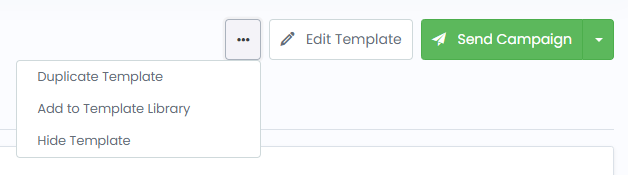
- In the top right corner, click the three vertical dots next to either
Edit TemplateorSend Campaign. - From the dropdown menu, select
Hide Template.
How to Find and Unhide a Hidden Template
If you need to reuse a hidden template in the future, you can easily unhide it using the filters.
Steps to Unhide a Template
- Log in to your BulkMail account.
- Go to the Templates section.
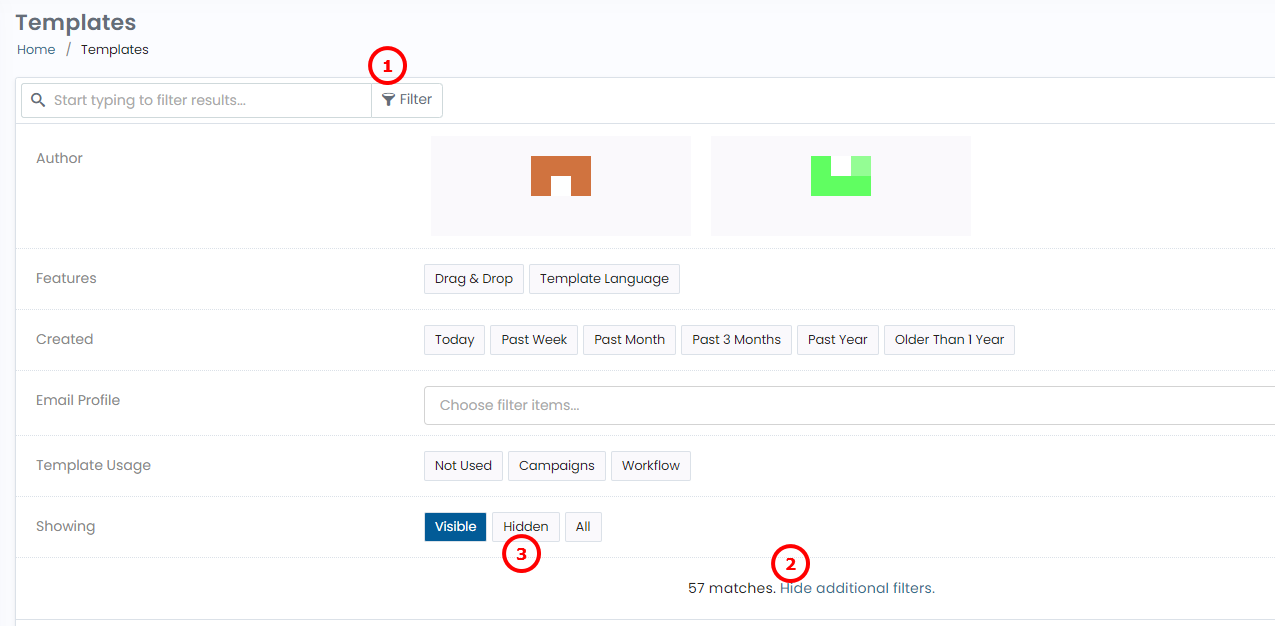
- Click on
Filterat the top of the template list. - Select
Show additional filtersto expand all filter options. - From the filter options, choose
Hiddento reveal hidden templates. - Open the template you want to restore.
- In the top right corner, click the three vertical dots next to
Edit TemplateorSend Campaign. - Choose
Unhide Templatefrom the dropdown.
The template will now be visible in your regular template list and ready to use again.
Why Use the Hide Feature?
- Keep your template library organised without permanent deletion
- Reduce visual clutter when managing large numbers of templates
- Easily bring back hidden templates when needed
This approach is ideal for seasonal templates, legacy designs, or older formats you want to keep but don’t actively use.