
What Is a Catch-All or Accept-All Email?
A catch-all (or accept-all) email is a domain-level configuration where the mail server is set to accept all emails, regardless of whether the specific mailbox exists. This means that even if the email address is incorrect or misspelled, the domain's mail server still accepts the message — making it impossible to know in advance whether the address is truly valid.
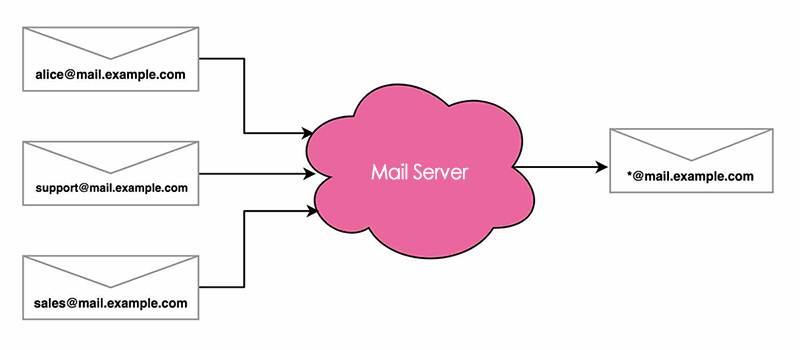
How Does a Catch-All Email Work?
Let’s say your domain is mail.example.com and the following email addresses are set up:
Now, if your domain is configured as catch-all, any emails sent to:
...will still be accepted — even if these addresses don’t actually exist.
This is typically done by setting a wildcard rule like *@mail.example.com to forward all emails to a designated inbox.
Why Organisations Use Catch-All Emails
Catch-all settings are commonly used by:
| Organisation Type | Reason |
|---|---|
| Small businesses | To ensure no email is missed due to typos or unconfigured addresses. |
| Large institutions | As a redundancy or security layer to capture all inbound communication. |
| Educational/Government | For oversight, retention, or mail auditing purposes. |
In some cases, catch-alls are used intentionally to hide email validity from bots or spam senders.
Can You Send Marketing Emails to Catch-All Domains?
It depends. While catch-alls accept the email at the server level, they often bounce later if the recipient address doesn’t exist. This creates a false positive — the system says “deliverable,” but the mailbox doesn’t actually exist.
Key Factors:
- Clean lists perform better. If your list is organic and permission-based, catch-alls may be largely deliverable.
If your list has a high invalid rate, your catch-alls are more likely to bounce.
- Example: If your list has 10% invalids, you could expect up to 5% of catch-alls to bounce.
- Purchased or scraped lists? Avoid catch-all addresses entirely — the risk to sender reputation is too high.
Best Practice: How to Handle Catch-All Emails
To minimise risk and maximise deliverability:
| Step | Action |
|---|---|
| 1 | Clean your list first — remove known invalid and risky addresses. |
| 2 | Segment catch-alls from your main list. Don’t send to them on your first mailout. |
| 3 | Send in small batches — gradually test the catch-all addresses to identify bounces. |
| 4 | Use a separate sending domain/account — this protects your main sender reputation. |
| 5 | Monitor bounce rates closely — remove any addresses that return hard bounces. |
| 6 | Avoid sending to catch-alls from rented or unknown sources — it’s simply not worth it. |
Should You Keep or Delete Catch-All and Unknown Emails?
Catch-all and unknown results often appear in email verification reports. Rather than deleting them outright, consider the context and source of the list:
- If your data is first-party and recent, keep them in a test segment.
- If the data is rented, bought, or old, remove them immediately.
- Use the
send_transactionalflag from BulkMail’s API to assess sending suitability (1= likely valid).
For more guidance, refer to our article: “Should You Keep or Delete Accept-All & Unknown Emails”
Final Thoughts
Catch-all emails are not inherently bad — but they require careful handling. When used wisely, they can be part of a healthy list strategy. But mismanaging them can lead to high bounce rates, poor inbox placement, and a damaged sending domain.
When in doubt, clean, test, segment, and monitor — and always prioritise consent and list hygiene.